

Refer and earn
Invite fellow merchants to run their stores on Akoole and accumulate ₦5,000 billing credits for every store that subscribes to a paid plan, slashing or completely wiping out your monthly software bill.
Owners and managers looking to reduce operating overheads through store referrals.
How the referral program works
Section titled “How the referral program works”- Share your unique link or code: Every Akoole store has an auto-generated referral code and personalized sign-up link.
- Your friend launches their store: When they register through your link, their new shop is tied to your referral account.
- They subscribe to any paid plan: Once their free trial completes and they activate their first paid plan (Starter, Growth, or Business), your organisation automatically receives a ₦5,000 billing credit.
- Credits apply automatically: Your accumulated credit balance is deducted automatically on your next subscription invoice. For example, on the ₦15,000/month Starter plan, 3 active referrals pay for your entire month 100% free.
-
Open Refer & Earn
Click Refer & Earn in the left sidebar under the Settings section or navigate directly to
/referrals.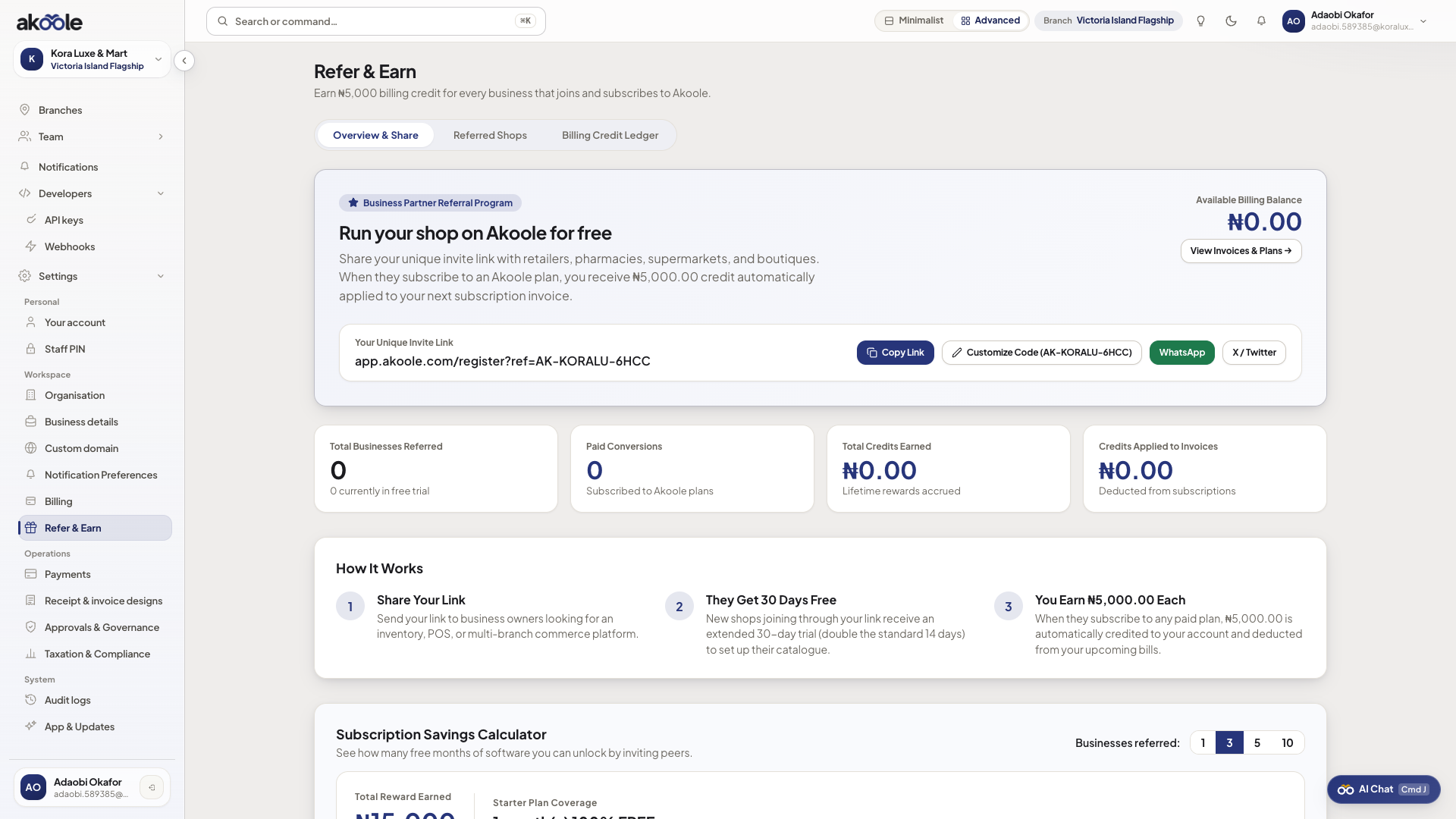
Refer and Earn with your referral link and stats -
Copy your referral code or share link
- Click Copy Link to copy your unique URL (
https://app.akoole.com/register?ref=YOURCODE) to your clipboard. - Click the WhatsApp button to immediately compose a pre-filled referral invitation message to your merchant network.
- Click Copy Link to copy your unique URL (
-
Simulate your savings
Use the interactive calculator slider on the Overview tab:
- Move the slider from 1 to 20 referred friends.
- The calculator displays your projected monthly credits (e.g. 5 stores = ₦25,000) and plan coverage (e.g. “1 month(s) 100% FREE + ₦10,000 carryover”).
-
Track invited stores in the Activity ledger
Switch to the Referred Shops tab (
/referralsactivity):- Review each business that registered using your link, their active plan, and their current referral status:
- Free Trial: The shop is currently trialing Akoole.
- Subscribed & Credited: The shop subscribed to a paid plan, and your ₦5,000 reward has been credited to your ledger.
- Filter by status (All, Trialing, or Subscribed / Rewarded) or search by shop name.
- Review each business that registered using your link, their active plan, and their current referral status:
-
Review credit balance and transactions
Switch to the Credit Ledger tab:
- View your total available credit balance, lifetime earnings, and total credits applied to past invoices.
- Audit every credit entry with reference IDs, creation timestamps, and invoice deductions.
Verification
Section titled “Verification”- When a colleague registers via your referral link, their business appears on your Referred Shops tab with the
Free Trialstatus. - Once their billing succeeds, the status transitions to
Subscribed & Credited, and ₦5,000 is added to your credit balance. - Check Settings → Billing to confirm that credits are automatically drawn down against upcoming subscription renewals.
What can go wrong
Section titled “What can go wrong”- Friend registered without the referral link: Your friend must use your referral URL or enter your referral code during initial registration. Retroactive referral linking is not supported.
- Credits not showing up immediately: Credits are issued when the referred store’s first payment clears successfully after their 14-day trial, not upon initial sign-up.
- Billing and plans - Manage your subscription tier, invoices, and payment cards.
- Branches - Expand your store into multi-location operations.