

Create your shop
Set up your shop in three quick steps: shop → first product → open POS. Your logo, business registration, extra branches and staff invites can wait. Home keeps a checklist for later.
Before you start
Section titled “Before you start”Owners. You cannot create a second organisation from this wizard; this is the first shop on the account.
- You have an Akoole account. You don’t need to verify your email first.
- Choose a slug you can say out loud:
demomart→demomart.akoole.shop. - Have a location name ready (Main, Surulere, etc.).
-
Enter the wizard
After signup you go to
/onboarding(or Set up shop now from verify). If you skipped earlier, Home offers Create shop (/shop/create). Progress is already off 0% because the account exists.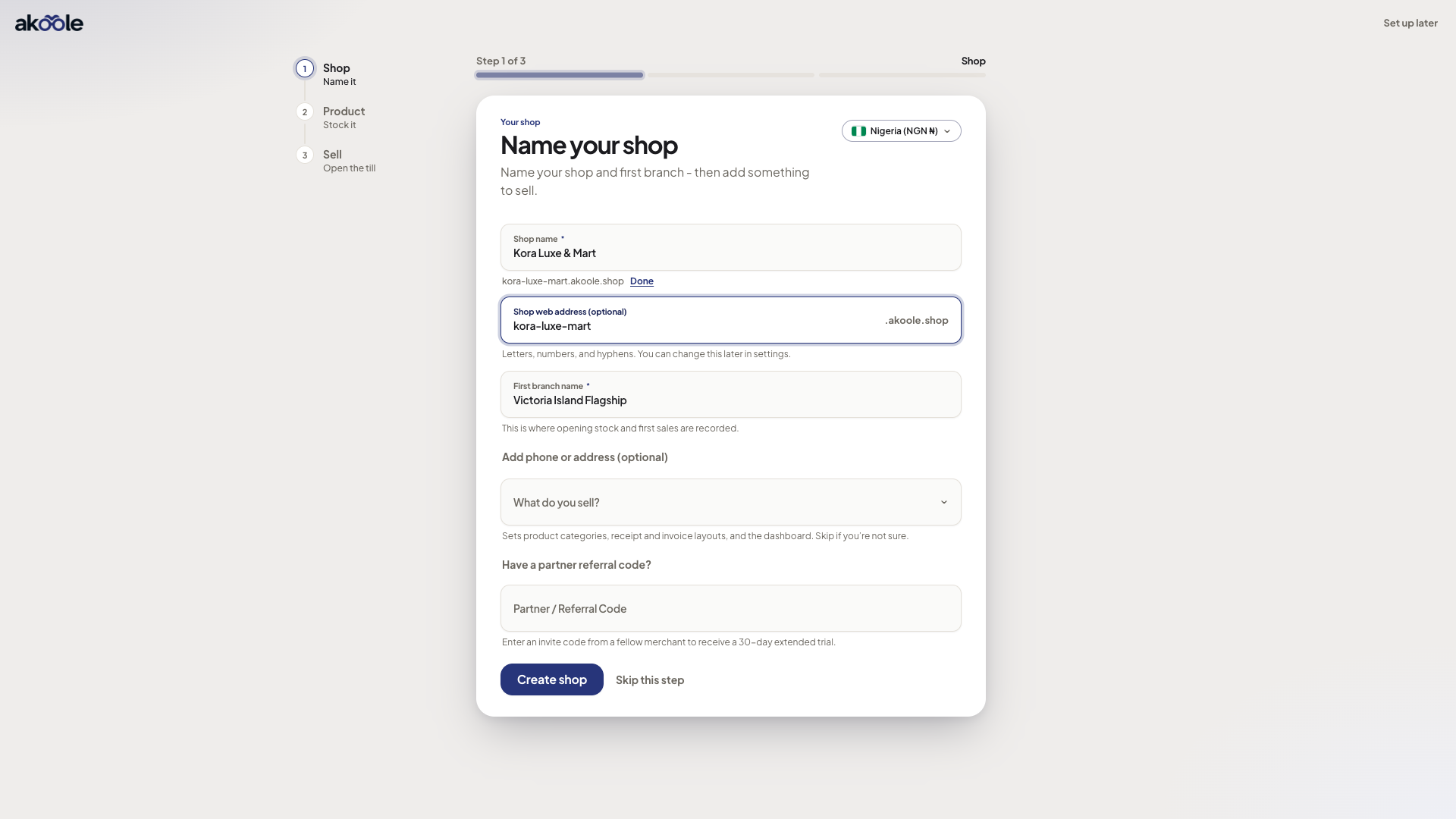
Onboarding step 1: your shop -
Name, industry, slug
Type the shop name, for example Akoole Demo Mart. Pick an industry if you want starter product chips later (retail, pharmacy, electronics, …) or leave it.
The slug is generated from the name; you can edit it. Preview shows
{slug}.akoole.shop. Reserved words likeshoporstoreare blocked. -
First location
Default branch is often Main. Add phone and address if you have them (Surulere, Lagos). Address can start from the shop name and stay editable. This creates the organisation, the default branch, and your Owner membership.
-
Watch the full onboarding once
The happy path is short: save shop, add one sellable product, then Open POS. Brand, bank, and invite are quiet links - not required to ring ₦2,800 of Peak Milk.
-
Skip without losing the account
Header Skip setup leaves the wizard at any time (saved). Skip a single step if you need to. If you skip before a shop exists, Home shows a create-shop button. Completing a step plays a short celebration.
-
Aftercare on Home
Once the shop exists, Home keeps Finish setting up: product, bank, brand (logo/icon/tagline), phone, invite. You can dismiss the guide. After the first sale on Starter, a compact Growth nudge for the online shop may appear - dismissible, not a paywall.
What success looks like
Section titled “What success looks like”Akoole Demo Mart exists, you are Owner, Main (Surulere) is the default branch, and the staff URL is app.akoole.com. The public shop, when the plan includes it, is {slug}.akoole.shop. Next: one product, then Open POS.
If something goes wrong
Section titled “If something goes wrong”Slug is taken or invalid
Pick another DNS-safe name (letters, numbers, hyphens). The staff and public shop share that slug.
I already have a shop on this account
You will not see the empty-state wizard. Use Branches to add outlets (plan allowing), not a second signup.