

Set up product variants
You generate every sellable combination (for example colour × storage) without typing each SKU by hand.
-
Start a product with options
Add a product (for example Tecno Spark 20). Turn on This product has multiple options / variants.
-
Add option rows
Add Option 1 (Colour: Black, White) and Option 2 (Storage: 128GB, 256GB). Akoole builds the full matrix.
-
Fill the matrix
Use quick-fill for retail price, or set naira prices, floor, barcodes, and reorder levels per row. Hide combinations you do not stock instead of deleting the option.
Show screenshot
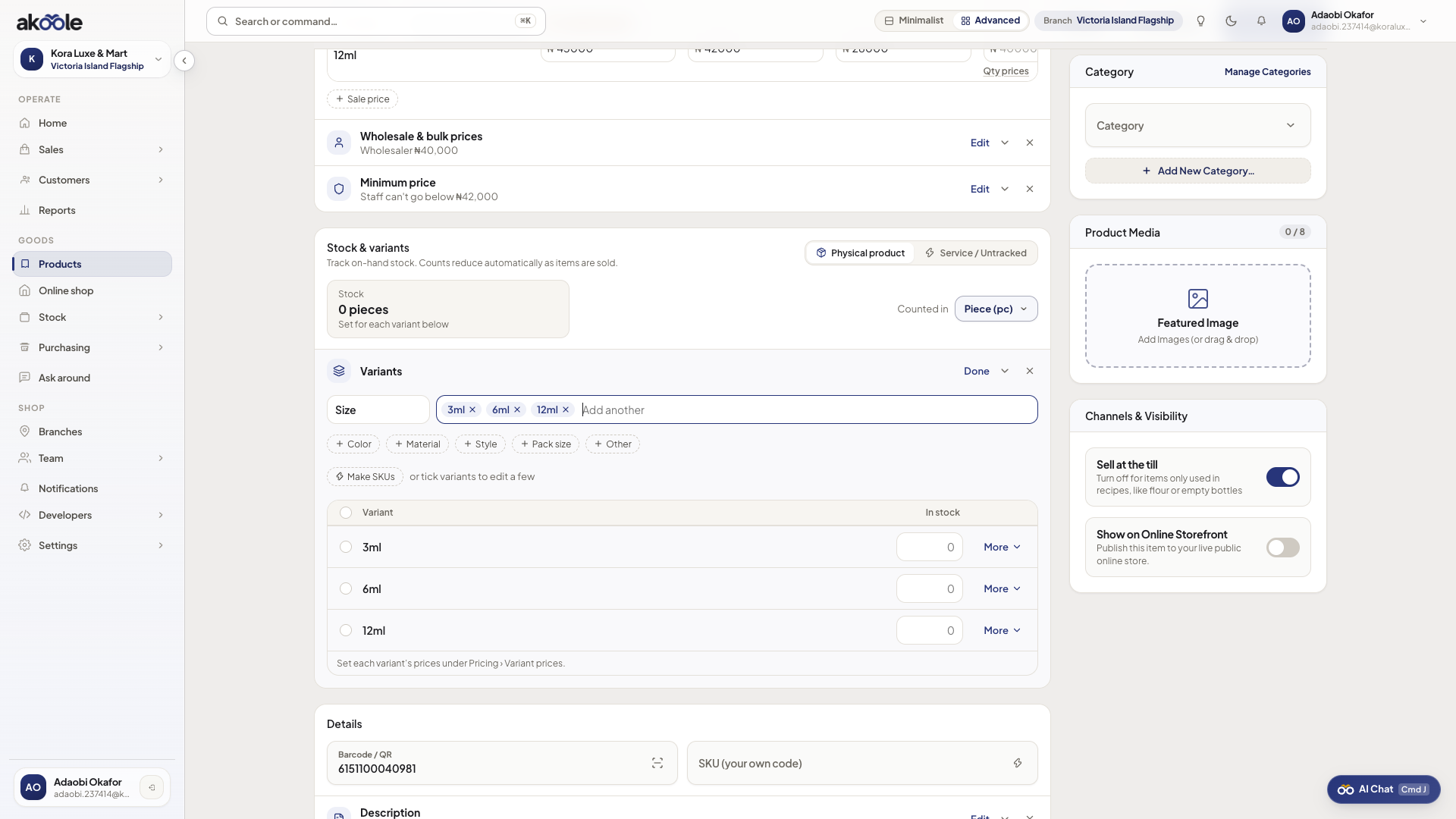
Variant matrix on a new product -
Photos per variant
Attach a thumbnail to each row cashiers and online shoppers should recognise (black vs white pack).
-
Save and check POS
Save. On POS, searching Tecno Spark 20 should ask for colour and storage, not a generic line.
If something goes wrong
Section titled “If something goes wrong”Too many empty rows
Turn visibility off on combinations you never buy. Do not create options you cannot replenish.
Wrong price on one colour
Open the product and edit that matrix row. Quick-fill overwrites every row - use it only when prices really match.