

Business details
Save contact, registration numbers, a verified NUBAN, and footer text so invoices show how to pay Akoole Demo Mart.
-
Open Business details
Go to Settings → Business (
/settings/business). Phone and bank here also tick Home’s setup checklist.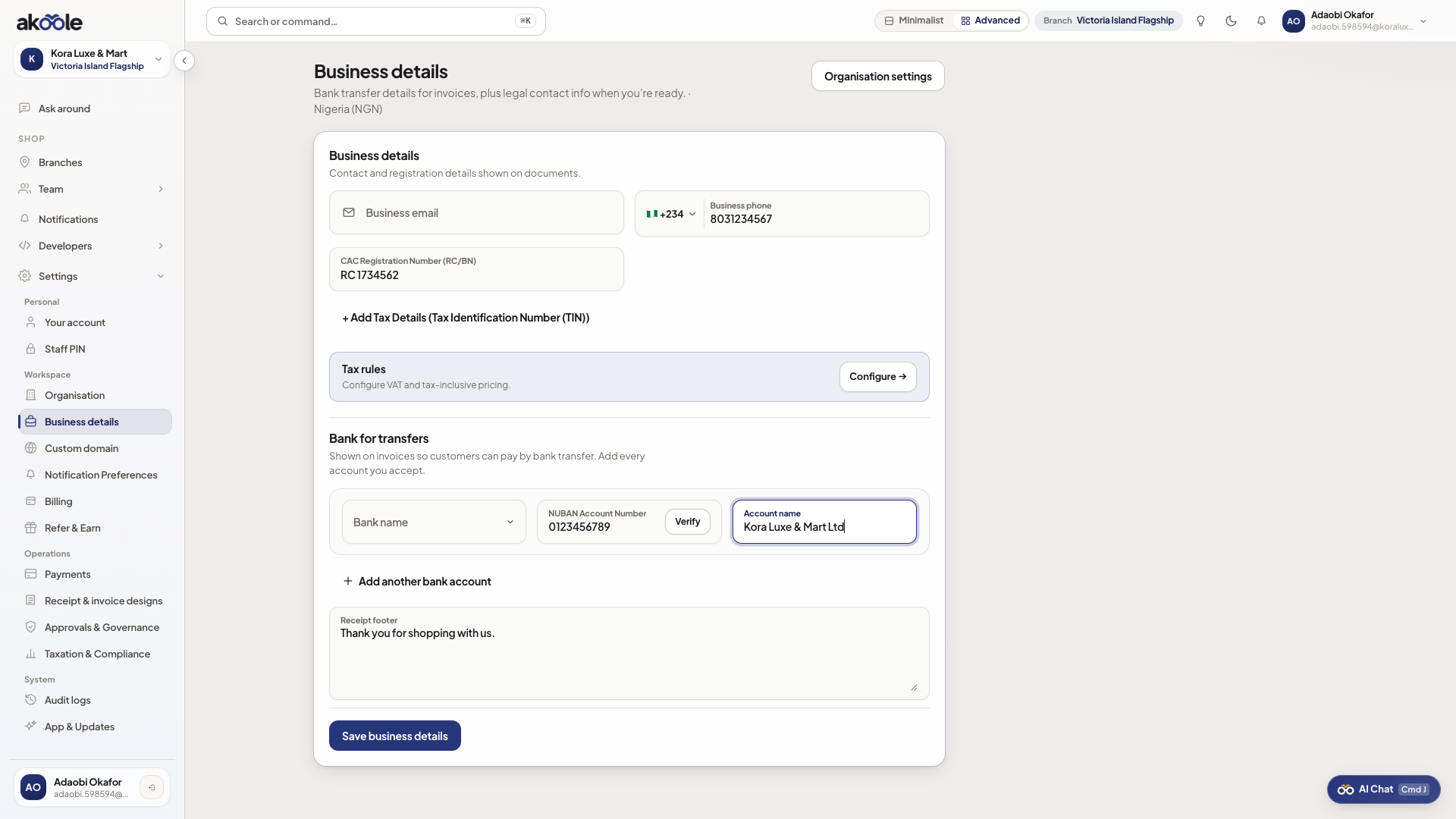
Business details page -
Contact
Set business email and WhatsApp-ready phone (Nigeria format). This is the shop contact on documents, not necessarily your login email.
-
CAC, TIN, VAT
Enter registration numbers as they should appear on invoices. VAT here is identity and pricing context. Reports can summarise VAT for your accountant; Akoole is not a filing product.
-
Resolve the NUBAN
Pick the bank, type the 10-digit account number, and resolve. Akoole returns the account name so you do not print a wrong transfer destination. Save that name if it matches your shop.
-
Receipt footer
Add footer text (“Goods sold in good condition. God bless.” or return hours). Save. New receipts and invoices pick this up.
If something goes wrong
Section titled “If something goes wrong”Account name does not resolve
Confirm 10 digits and the correct bank. Name enquiry needs a network call; retry once. Do not guess a name onto the invoice.
I thought this filed VAT
It does not. Hand summaries to your tax agent. Keep numbers accurate on paper you give customers.