

Storefront customer referrals
Create a customer-to-customer viral loop on your online shop: existing buyers share their referral links, new shoppers receive a welcome discount, and referring advocates earn store wallet credits on successful orders.
Merchants on Growth and Business plans looking to scale ecommerce acquisition organically.
How customer referrals work
Section titled “How customer referrals work”- Advocate receives a referral link: Every registered shopper has a personalized referral link and code in their storefront account dashboard (
/account/referrals). - Friend shops with a discount: When an invited friend visits your storefront using the link, a discount is automatically applied to their cart (e.g., ₦2,000 off orders over ₦10,000).
- Advocate earns store rewards: Once the friend’s order is fulfilled, the advocate receives store wallet credit (e.g., ₦1,000) or a gift voucher to spend on their next purchase.
-
Open Storefront Referrals
In the staff app, go to Online shop → Referrals (
/storefront/referrals).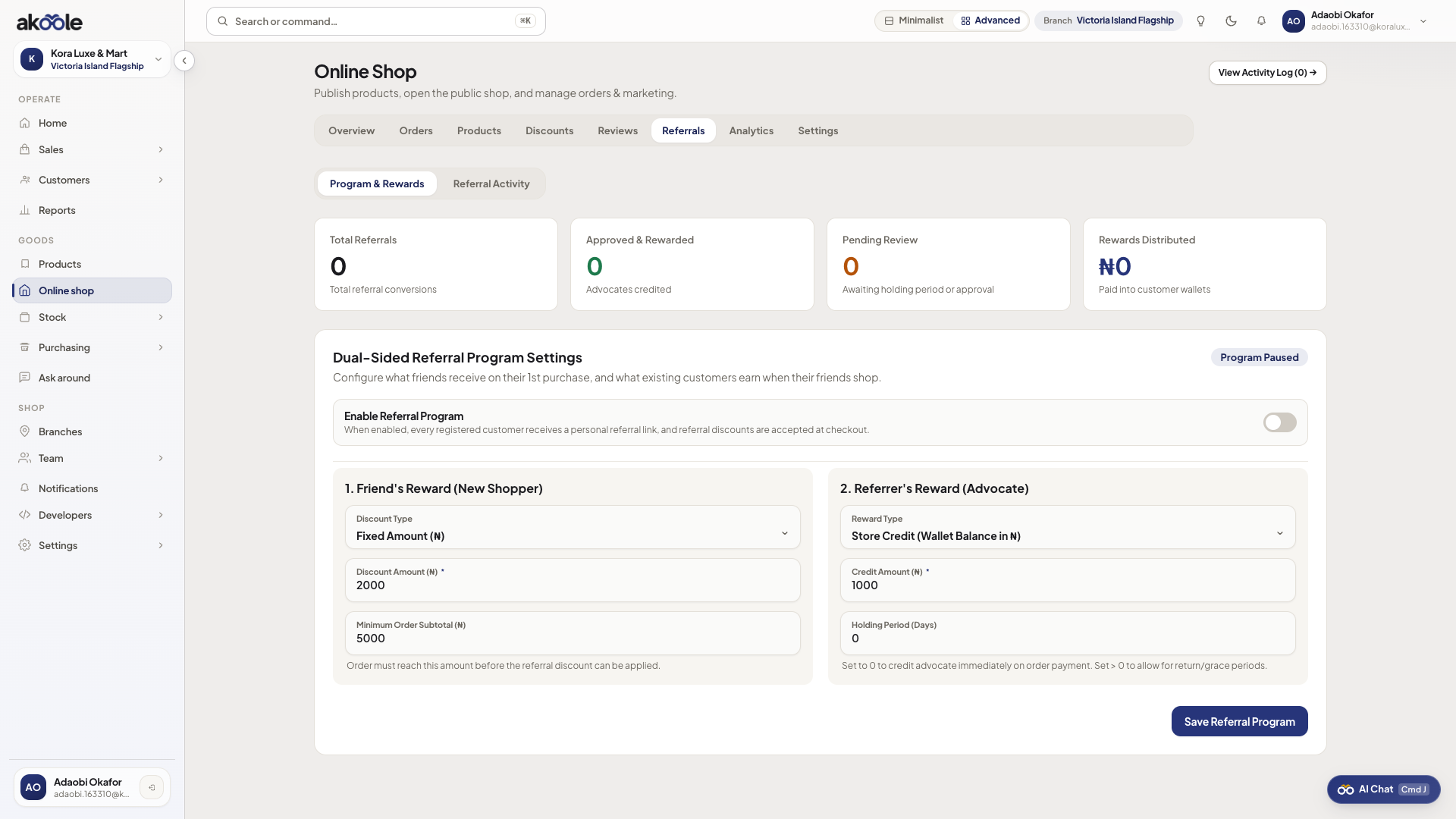
Shopper referral program settings -
Configure the Friend Incentive
- Reward Type: Choose between Fixed Naira Discount (e.g.
₦2,000 off) or Percentage Off (e.g.10% off). - Minimum Subtotal: Protect margins by requiring a minimum qualifying order spend (e.g.
₦10,000).
- Reward Type: Choose between Fixed Naira Discount (e.g.
-
Configure the Advocate Reward
- Reward Type: Select Store Wallet Credit (deposited into the customer’s store balance) or Discount Code.
- Reward Amount: Specify the value earned per successful conversion (e.g.
₦1,000). - Approval Rule: Automatically approve rewards when orders reach Fulfilled status or review manually.
-
Activate the Program
Toggle Enable Customer Referrals on and click Save Configuration.
-
Track referral sales and activity
Switch to the Activity tab (
/storefront/referrals/activity):- Review all referred orders, advocate names, friend names, purchase amounts, and reward statuses.
- Filter by status: Pending Review, Approved & Credited, or Revoked (e.g., if the referred order was cancelled or returned).
- Use pagination controls to navigate across referral history.
Verification
Section titled “Verification”- Register as a shopper on your storefront, go to your account page, and copy your referral link.
- In an incognito window, open the referral link and add an eligible item to cart; verify that the welcome discount applies at checkout.
- Check Online shop → Referrals → Activity in the staff app to confirm that the conversion event was tracked.
What can go wrong
Section titled “What can go wrong”- Discount not applying at checkout: Ensure the cart subtotal meets the configured Minimum Subtotal threshold.
- Advocate not receiving credit: Referral rewards are credited only after the referred order is marked as fulfilled and paid, preventing rewards on cancelled orders.
- Discount codes - Create campaign discount codes for social media sales.
- Loyalty and rewards - Set up points-per-naira loyalty for both counter and online purchases.