

Loyalty and rewards
Drive repeat visits and increase basket size by awarding shoppers points on every naira spent, establishing VIP customer tiers, and letting customers redeem points directly at the checkout counter.
Before you start
Section titled “Before you start”Stores on the Growth and Business plans wanting a built-in retail rewards program without external apps.
- Customer profiles are recorded on the book (points attach to a customer’s phone number or name).
- Your store has defined a clear redemption rate (for example, 1 point per ₦100 spent, and 1 point = ₦1 on redemption).
-
Open Loyalty & Rewards settings
Navigate to Customers → Loyalty & Rewards (
/customers/loyalty) or Settings → Loyalty (/settings/loyalty).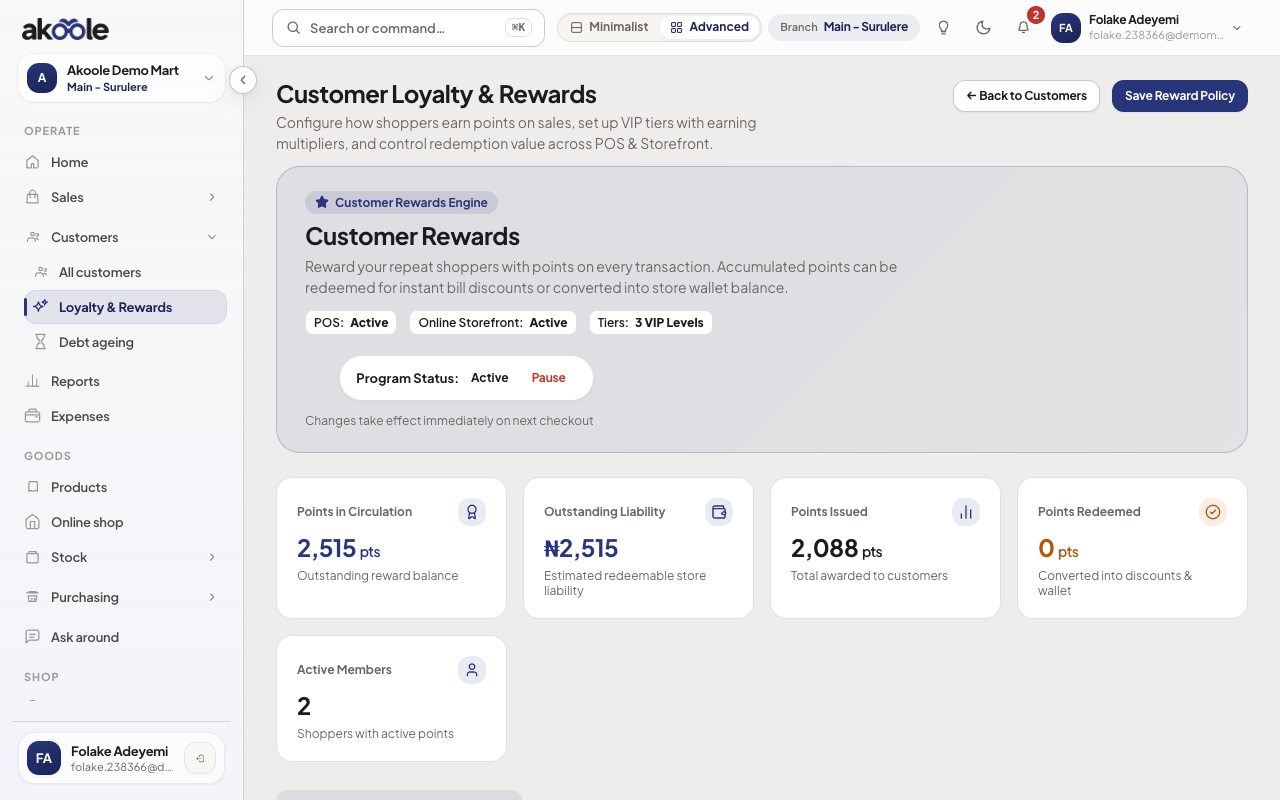
Customer Loyalty and Rewards with program status, points and earning rules -
Activate the Loyalty Program
Toggle Enable Loyalty Program on.
-
Configure earning and redemption rates
- Earning rate: Define points awarded per amount spent (e.g.,
1 point per ₦100 spent). - Redemption rate: Set the monetary value of each point (e.g.,
1 point = ₦1.00). - Minimum redemption threshold: Specify the minimum points required before a customer can redeem (e.g.,
100 points). - Maximum basket redemption %: Prevent 100% free orders by capping point deductions (e.g.,
max 50% of invoice total). - Point validity: Set expiration periods (e.g.,
365 daysfrom earn date, or leave blank for non-expiring points).
- Earning rate: Define points awarded per amount spent (e.g.,
-
Define VIP tiers and point multipliers
Set up progressive tiers to reward your best spenders:
- Bronze (Default): 1.0× multiplier.
- Silver (Spend > ₦100,000): 1.25× multiplier.
- Gold (Spend > ₦500,000): 1.5× multiplier.
- Platinum (Spend > ₦1,000,000): 2.0× multiplier.
Customers are automatically elevated to higher tiers as their cumulative spend grows.
-
Redeem points at the counter (POS)
During checkout at Sales → POS:
- Select or scan the customer profile into the cart.
- The register displays the customer’s available points and equivalent Naira discount.
- Click Redeem Points, enter the points to apply, and the total payable updates immediately.
-
Monitor points liability and member activity
Track total points issued, points redeemed, and the outstanding Naira liability in your loyalty analytics cards. Review individual customer balances on Customers → Profiles (
/customers/:uuid).
Verification
Section titled “Verification”- Complete a test sale with a linked customer profile; verify on the receipt that points earned are displayed.
- Open the customer’s profile at
/customersto confirm their updated points balance and tier badge.
What can go wrong
Section titled “What can go wrong”- Points not awarding: The customer must be attached to the sale before final payment. Anonymous/walk-in guest sales cannot accumulate points.
- Plan limitation: Loyalty programs require the Growth or Business tier. On the Starter plan, upgrade under Settings → Billing.
- Customer profiles - Track purchase history, balances, and contact details.
- Storefront customer referrals - Turn your shoppers into brand advocates.